

在過去 20 天中,我們專注於 Embabel 後端如何透過 GOAP 演算法、Spring AI 與 ActionAudit 進行嚴密的流程規劃與確定性運算。
然而,當 Agent 完成了一連串複雜的分析、算出了年度消費指標、整理了十幾筆旅遊歷史、並提出了專屬折扣方案後,最終該如何把這份結果呈現給使用者?
如果永遠只讓 LLM 吐出一段純文字或 Markdown 表格:
但如果走另一個極端——直接讓 LLM 生成可執行的 React / JSX 程式碼,又會引發嚴重的安全性漏洞(XSS 惡意腳本注入)與語法崩潰(Hallucinated Components)。
今天我們正式跨入前端領域,認識由 Vercel Labs 開源的現代 Generative UI 核心框架——json-render。
eval() 或 Sandpack 即時編譯執行。<script> 或偷取 Cookie 的請求。</div> 或 import 了一個不存在的套件,整頁直接白屏報錯。
MetricCard、DataTable、Stack)。{ root, elements })。type 映射為實際的 Native React / React Native 原生元件。一句話總結其核心價值:讓 AI 決定「資料該用什麼元件呈現」,但徹底剝奪其「執行任意前端程式碼」的權力。
在 json-render.dev 官方架構中,系統由以下關鍵技術支撐:
Catalog 是 AI 的受控詞彙表。透過 Zod Schema,我們為每一個 UI 元件定義精確的屬性契約:
import { z } from 'zod';

export const MetricCardSchema = z.object({
  title: z.string().describe("指標名稱"),
  value: z.union([z.string(), z.number()]).describe("指標數值"),
  trend: z.enum(["up", "down", "neutral"]).optional().describe("趨勢方向"),
  changePercent: z.number().optional().describe("變動百分比")
});
json-render 捨棄了傳統 JSX 的深度巢狀結構,採用 root + elements Map 的扁平化設計:
key。children 陣列只存放子節點的 key 字串(如 ["child_1", "child_2"]),而非巢狀物件。因為 Spec 只是純粹的 JSON,因此相同的後端輸出可以無縫在多終端渲染:
@json-render/react:渲染為 React DOM (搭配 Tailwind/Shadcn)。@json-render/react-native:渲染為 iOS / Android 原生元件。@json-render/react-pdf:直接將同一份 Dashboard 轉為可下載的 PDF 報表。以下我們實作前端的 Catalog 定義與 Component Registry,以及後端對應的 Java Spec Record。
// src/components/dashboard/dashboardCatalog.ts
import { z } from 'zod';
import React from 'react';

/**
 * 1. 定義允許 AI 使用的元件 Props Schema (Catalog)
 */
export const DashboardCatalog = {
  Stack: z.object({
    direction: z.enum(["horizontal", "vertical"]).default("vertical"),
    gap: z.number().default(4),
  }),
  MetricCard: z.object({
    title: z.string(),
    value: z.union([z.string(), z.number()]),
    trend: z.enum(["up", "down", "neutral"]).optional(),
    change: z.string().optional(),
  }),
  AlertBanner: z.object({
    severity: z.enum(["info", "warning", "error", "success"]),
    message: z.string(),
  }),
};

export type DashboardCatalogType = typeof DashboardCatalog;

/**
 * 2. 實作原生 React 元件登錄表 (Registry)
 */
export const dashboardRegistry: Record<string, React.FC<any>> = {
  Stack: ({ direction, gap, children }) => (
    <div className={`flex ${direction === 'horizontal' ? 'flex-row' : 'flex-col'} gap-${gap} w-full`}>
      {children}
    </div>
  ),
  MetricCard: ({ title, value, trend, change }) => (
    <div className="p-4 bg-slate-900 border border-slate-800 rounded-xl shadow-sm">
      <span className="text-sm font-medium text-slate-400">{title}</span>
      <div className="text-2xl font-bold text-slate-100 mt-1">{value}</div>
      {change && (
        <span className={`text-xs mt-1 inline-block ${trend === 'up' ? 'text-emerald-400' : 'text-rose-400'}`}>
          {trend === 'up' ? '▲' : '▼'} {change}
        </span>
      )}
    </div>
  ),
  AlertBanner: ({ severity, message }) => {
    const colorMap = {
      info: "bg-blue-950/50 border-blue-800 text-blue-300",
      warning: "bg-amber-950/50 border-amber-800 text-amber-300",
      error: "bg-rose-950/50 border-rose-800 text-rose-300",
      success: "bg-emerald-950/50 border-emerald-800 text-emerald-300",
    };
    return (
      <div className={`p-3 border rounded-lg text-sm ${colorMap[severity] || colorMap.info}`}>
        {message}
      </div>
    );
  }
};
package com.antechinus.travel.spec;

import java.util.List;
import java.util.Map;

/**
 * json-render 相容的扁平儀表板規格實體
 *
 * @param root 根節點識別碼
 * @param elements 所有 UI 元件的扁平映射表 (Key -> ElementSpec)
 */
public record DashboardSpec(
    String root,
    Map<String, ElementSpec> elements
) {
    /**
     * 單一 UI 元件規格定義
     *
     * @param type 元件類型名稱 (必須與前端 Catalog 完全對齊)
     * @param props 傳入元件的屬性鍵值對
     * @param children 子節點的 Key 清單 (扁平引用)
     */
    public record ElementSpec(
        String type,
        Map<String, Object> props,
        List<String> children
    ) {}

    /**
     * 靜態工廠方法:建立一個簡單的預警儀表板
     */
    public static DashboardSpec sample() {
        return new DashboardSpec(
            "root_container",
            Map.of(
                "root_container", new ElementSpec("Stack", Map.of("direction", "vertical", "gap", 4), List.of("alert_1", "metric_row")),
                "alert_1", new ElementSpec("AlertBanner", Map.of("severity", "warning", "message", "偵測到該客戶近期有 1 筆取消爭議"), List.of()),
                "metric_row", new ElementSpec("Stack", Map.of("direction", "horizontal", "gap", 4), List.of("metric_spend", "metric_trips")),
                "metric_spend", new ElementSpec("MetricCard", Map.of("title", "近一年總消費", "value", "NT$ 143,000", "trend", "up", "change", "+18%"), List.of()),
                "metric_trips", new ElementSpec("MetricCard", Map.of("title", "累積旅程數", "value", 4, "trend", "neutral"), List.of())
            )
        );
    }
}
onClick="alert(1)")
dangerouslySetInnerHTML 或動態 Function 執行,立即產生 XSS 漏洞。action: { type: "REFRESH_DATA" }),由前端 ActionProvider 統一派發。type: "DatePickerCalendar",前端 Registry 找不到該元件直接報錯崩潰。FallbackComponent;當遇到未知 type 時,自動以灰階 Raw JSON 容器容錯顯示,確保頁面不崩潰。DataTable 的 props.rows,LLM 只負責決定外層排版與敘事解讀(Day 24 專門詳解)。| 評估維度 | ❌ Raw JSX / Code 生成 (Bad) | ❌ 純 Markdown 生成 (Bad) | ✅ json-render Spec (Good) |
|---|---|---|---|
| 安全性 (XSS 防護) | 極度危險,易遭任意代碼注入 | 安全,但僅限文字 | 100% 安全,僅渲染受控白名單元件 |
| 結構穩定度 | 極易產生語法錯誤導致白屏 | 格式容易跑版 | 嚴格校驗,基於 Zod Schema 驗證 |
| 串流流暢度 | 邊吐邊崩潰,無法局部渲染 | 只能純文字串流 | 天然支援漸進式 Partial 渲染 |
| 跨端能力 | 僅能跑在特定 Web 架構 | 跨端但無互動 | 一份 JSON,多端(Web/App/PDF)共用 |
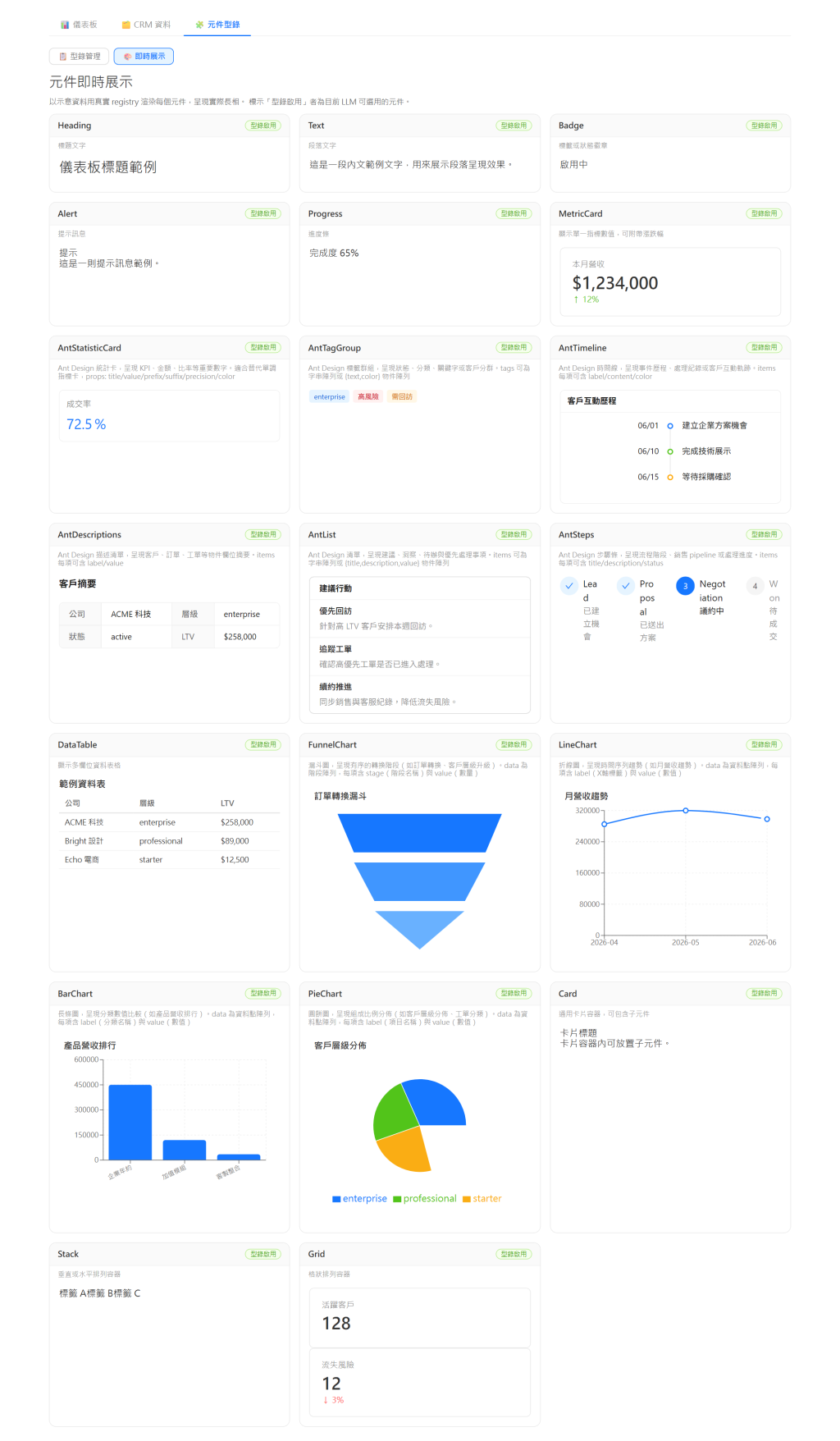
以下畫面來自本系列配套實作系統(Embabel + json-render POC)的「元件型錄 → 即時展示」頁:Registry 中的每個原生元件(MetricCard、DataTable、圖表、Ant Design 系列等)都以示意資料實際渲染,標示「型錄啟用」者即為當前允許 LLM 使用的白名單元件——Catalog(受控詞彙表)與 Registry(原生實作)在同一頁完成對齊。
Stack、MetricCard 與 AlertBanner 的元件屬性結構。root + elements 規範。


 iThome鐵人賽
 看影片追技術